
To disable a payment method for specific products in WooCommerce, hook woocommerce_available_payment_gateways, loop over the cart, and unset the gateway (for example $gateways['cod']) when a matching product or category is present. Without code, GoUp Payment Gateway by Product & Category does it with a rule: choose products or categories, choose Hide or Allow only, and tick the gateways. Both approaches work with the Checkout Block.
Key takeaways
- WooCommerce has no per-product or per-category payment setting; every enabled gateway shows for every order.
- All solutions hook woocommerce_available_payment_gateways and inspect the cart; the same filter runs for the Checkout Block through the Store API.
- Match categories on the parent product_id, not variation_id, and never rely on is_checkout() inside the filter.
- Use Hide to remove one gateway, or Allow only to keep a single gateway (for example bank transfer for high-value items).
WooCommerce has no built-in setting to hide a payment method for a specific product or product category. Every gateway you enable under WooCommerce → Settings → Payments appears for every order. That is a problem the moment you sell gift vouchers that cannot be paid with Cash on Delivery, high-value equipment you only want paid by bank transfer, or pre-orders that should never go through PayPal because of dispute windows.
This guide shows the two reliable ways to disable a payment method for specific products or categories in WooCommerce: a short code snippet for functions.php, and a no-code rules plugin. Both work with the classic checkout, the Checkout Block and High-Performance Order Storage (HPOS).
Why WooCommerce shows every payment method on every order
WooCommerce builds the checkout's payment list from the woocommerce_available_payment_gateways filter. Each enabled gateway checks its own is_available() method — currency support, minimum order amount, country restrictions for some gateways — but none of them look at the products in the cart. If you want "no Cash on Delivery when a gift card is in the basket", something has to add that logic.
There are three things people search for, and they all come back to the same hook:
- Disable a payment method for a specific product (one SKU, or a handful).
- Hide a payment gateway by product category (everything in Gift Cards or Wholesale).
- Restrict payment methods by product, meaning only one gateway is allowed when the product is present.
Option 1: Disable the payment method with a code snippet
Add the following to your child theme's functions.php or to a code-snippets plugin. It hides Cash on Delivery (cod) whenever any cart item belongs to the gift-cards category or is product ID 123.
add_filter( 'woocommerce_available_payment_gateways', function ( $gateways ) {
    if ( is_admin() || ! WC()->cart ) {
        return $gateways;
    }

    $blocked_products   = array( 123 );          // product IDs
    $blocked_categories = array( 'gift-cards' ); // product_cat slugs

    foreach ( WC()->cart->get_cart() as $item ) {
        $product_id = $item['product_id'];       // parent ID, so variations match too

        if ( in_array( $product_id, $blocked_products, true )
            || has_term( $blocked_categories, 'product_cat', $product_id ) ) {
            unset( $gateways['cod'] );
            break;
        }
    }

    return $gateways;
} );
Gateway IDs you will need: cod (Cash on Delivery), bacs (Direct bank transfer), cheque, paypal or ppcp-gateway (PayPal Payments), stripe, woocommerce_payments. You can find any gateway ID in the URL of its settings page (§ion=cod).
To allow only one gateway instead of hiding one, replace the unset line with a loop that removes every key except the one you want:
foreach ( array_keys( $gateways ) as $id ) {
    if ( 'bacs' !== $id ) {
        unset( $gateways[ $id ] );
    }
}
Limitations of the snippet approach
- Product and category IDs are hard-coded. Every change means editing PHP on a live store.
- There is no message telling the customer why a payment method disappeared, so support tickets go up.
- Two snippets that touch the same gateway can silently cancel each other out.
- Nobody but the developer can see what rules exist. When the developer leaves, the rules become folklore.
For one product on a store you maintain yourself, the snippet is fine. For a store run by a team, use a plugin.
Option 2: Disable payment methods by product or category without code
GoUp Payment Gateway by Product & Category is a focused WooCommerce plugin that does exactly one job: show, hide or restrict payment gateways according to the products and categories in the cart. Here is the full setup.
- Install and activate the plugin, then open WooCommerce → Payment Gateway Rules → Rules → Add rule.
- Condition: choose Products (search by title, SKU or ID — parent products match their variations) or Categories (tick Include child categories if you want sub-categories covered).
- Match: ANY means one matching item in the cart is enough; ALL means every selected product or category must be present.
- Action: Hide removes the gateways you pick; Allow only keeps them and hides everything else.
- Gateways: tick the payment methods the rule applies to. The list is read from your site, so third-party gateways appear automatically.
- Customer message (optional): a checkout notice shown once per session explaining why a method is unavailable — "Gift cards cannot be paid by Cash on Delivery."
- Set a Priority and, if needed, Stop processing so later rules do not run. Save.
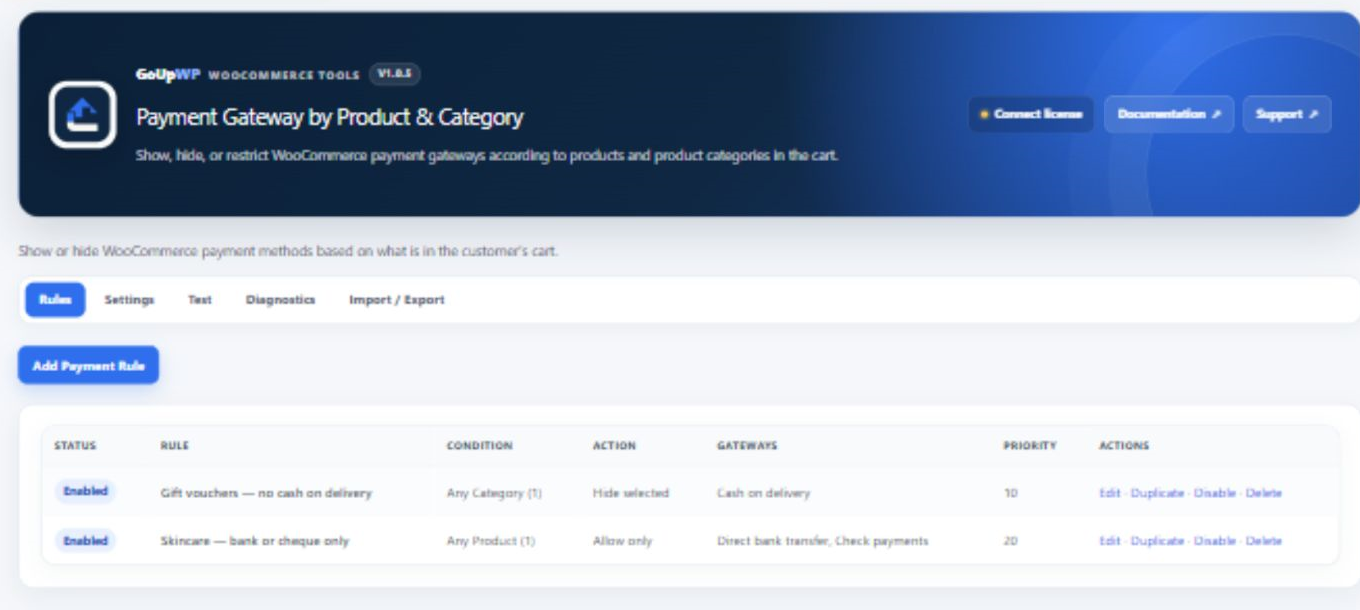
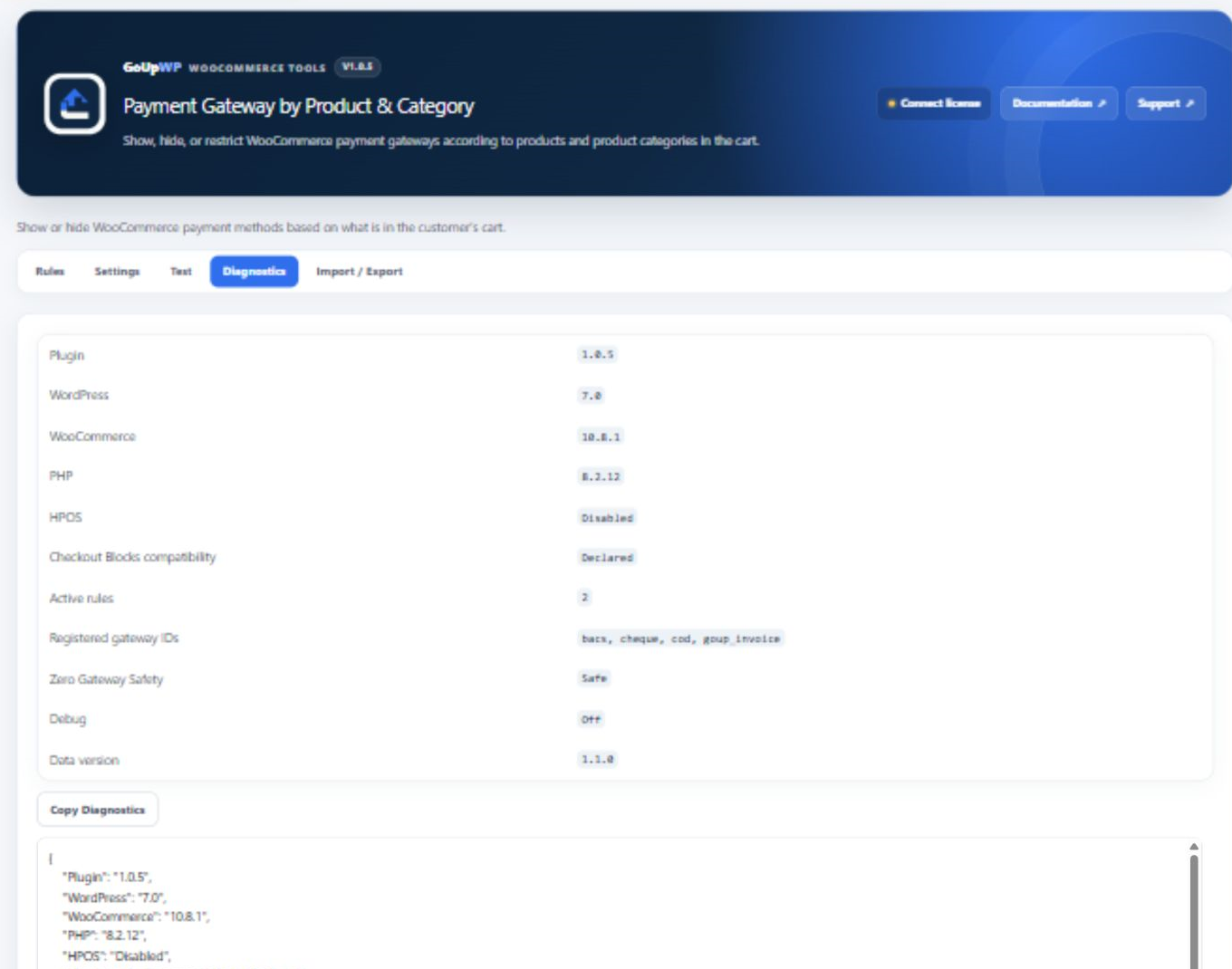
Rules are evaluated server-side through WooCommerce's normal available-gateway lifecycle, so they apply to the classic checkout, the Checkout Block and the order-pay page. When several rules match the same cart they combine restrictively: Hide removes gateways, Allow only intersects what is left. You can export the rules as JSON to move them from staging to production.
The plugin costs $12 per year for one production site plus one staging site, or $49 lifetime. See pricing and the documentation.
Code snippet vs plugin: which should you use?
| Code snippet | GoUp Payment Gateway by Product & Category | |
|---|---|---|
| Setup time | 10–20 minutes if you know the IDs | 3 minutes |
| Category rules with children | Manual has_term per category |
Tick a box |
| Variation matching | Use product_id, not variation_id |
Automatic |
| Customer-facing message | Write your own notice | Built in, per rule |
| Rule conflicts | Silent | Priority + stop processing |
| Checkout Block support | Yes, if written correctly | Yes |
| Cost | Free, plus developer time | $12/year |
Common mistakes when hiding payment gateways by product
Checking variation_id instead of product_id. Variable products put the variation ID in variation_id and the parent in product_id. Category checks must use the parent.
Using is_checkout() inside the filter. The Checkout Block loads gateways through the Store API where is_checkout() is false, so the rule silently stops working the day you switch to blocks.
Caching the gateway list. Some performance plugins cache fragments of the checkout. Exclude the checkout and cart pages from page caching or the hidden gateway may reappear.
Forgetting the order-pay page. Customers paying later from My Account → Orders → Pay go through a different flow. GoUp's plugin re-evaluates rules there; a snippet needs WC()->cart to be replaced with the order's items.
Related scenarios
- Hide a gateway based on the delivery option instead of the product: How to hide WooCommerce payment methods by shipping method.
- Hide Cash on Delivery for international customers: Disable Cash on Delivery by country in WooCommerce.
- Control shipping methods by category rather than payment: Disable a shipping method for a product category.
- Browse every WooCommerce payment plugin GoUpWP publishes.
Summary
To disable a payment method for specific products or categories in WooCommerce, hook woocommerce_available_payment_gateways, inspect the cart, and unset the gateway. That is the right answer for one product on a store you maintain yourself. When the rules multiply, change with the catalogue, or need a message that tells the customer why a method is missing, a rules screen with priorities, child-category matching and a diagnostics view is easier to trust than PHP nobody else can read.
Frequently asked questions
Can I disable Cash on Delivery for only one product category in WooCommerce?
Yes. With code, check has_term('your-category', 'product_cat', $product_id) for each cart item inside the woocommerce_available_payment_gateways filter and unset $gateways['cod']. With GoUp Payment Gateway by Product & Category, create a rule with Condition = Categories, pick the category, Action = Hide, Gateway = Cash on Delivery.
Does the woocommerce_available_payment_gateways filter work with the WooCommerce Checkout Block?
Yes. The Checkout Block asks the Store API for available gateways and the Store API runs the same filter, so a correctly written snippet applies to both the classic checkout and the block checkout. Snippets that rely on is_checkout() or template hooks usually do not.
What happens if my rules remove every payment method?
The customer cannot pay. GoUp Payment Gateway by Product & Category never forces a gateway back on — it will not override WooCommerce's own availability checks — so instead it shows a configurable message explaining why no method is available, warns you in the rule form that Allow only can empty the list, and its Diagnostics tab shows which rules fired for a test cart so you can fix the conflict.
Can I restrict a payment gateway to one product instead of hiding it?
Yes. Use the Allow only action: the selected gateways stay and everything else is hidden when the product is in the cart. In code, loop over the gateways and unset every key that is not in your allowed list.
Is there a free plugin to hide payment methods by product?
Yes, several free plugins on WordPress.org offer per-product gateway rules. Before choosing one, check three things: category rules that include child categories, variation matching, and Checkout Block support. GoUp Payment Gateway by Product & Category includes all three in its $12-a-year licence.