
WooCommerce has no Pay by Invoice gateway. The code workaround is to rename the Cheque gateway to 'Pay by Invoice' and hide it with woocommerce_available_payment_gateways unless the logged-in user has an approval flag. GoUp Approved Customer Invoice Gateway adds a real invoice method instead: approve individual customers, set default or per-customer terms such as Net 30, and the terms are recorded on every order.
Key takeaways
- WooCommerce has no invoice gateway and no way to approve individual customers for payment on terms.
- Credit is granted to a business, not a user role — per-account approval is safer than role-based invoice access.
- Record the terms (Net 30, PO required) on each order, so a later change to the customer never rewrites history.
- The quick workaround is the Cheque gateway renamed to Pay by Invoice and hidden behind a user-meta approval flag.
B2B and wholesale customers expect to order now and pay on terms. WooCommerce's answer is a gap: there is no invoice gateway, and no way to say "this customer may pay later, that one may not". Enabling Cheque or Bank Transfer for everyone turns every shopper into a credit risk. This guide shows how to add a Pay by Invoice payment method to WooCommerce that only approved customers can use — a code workaround for developers, and GoUp Approved Customer Invoice Gateway for a proper, auditable setup.
What "pay by invoice" needs to actually work
- An offline gateway that places the order without taking payment and sets a sensible status (On hold).
- Per-customer approval, because credit is granted to a business, not to a user role. A "wholesale" role often includes new accounts that have not passed a credit check.
- Terms recorded on the order — Net 30, Net 60, PO number — so accounting knows what was agreed at the time.
- Checks at every step: checkout load, order placement, and the pay-for-order page, in both the classic checkout and the Checkout Block.
Roles-based restrictions (offered by several free invoice gateways and B2B suites) cover point 1 and half of point 2. The rest is missing.
Option 1: The Cheque-gateway workaround with a snippet
WooCommerce's built-in Cheque gateway is offline and harmless. Rename it Pay by Invoice under WooCommerce → Settings → Payments → Cheque, then hide it from everyone who is not approved:
add_filter( 'woocommerce_available_payment_gateways', function ( $gateways ) {
    if ( is_admin() ) {
        return $gateways;
    }

    $user_id  = get_current_user_id();
    $approved = $user_id && 'yes' === get_user_meta( $user_id, '_invoice_approved', true );

    if ( ! $approved ) {
        unset( $gateways['cheque'] );
    }

    return $gateways;
} );
Approve a customer by adding the user meta _invoice_approved = yes (a snippet on the profile screen, or a one-line update with WP-CLI: wp user meta update 42 _invoice_approved yes).
Where the workaround falls short
- No admin screen to search, approve, revoke or bulk-manage customers.
- No terms per customer, and nothing recorded on the order — six months later nobody knows whether the order was Net 30 or Net 60.
- The Cheque gateway's wording ("Please send a cheque to…") appears in emails unless you rewrite it.
- Revoking a customer does not leave a trace on their historical orders.
Option 2: An approved-customer invoice gateway without code
GoUp Approved Customer Invoice Gateway adds a purpose-built Pay by Invoice method and the approval workflow around it.
- WooCommerce → Settings → Payments → Pay by Invoice: enable the method; set the title and description customers see; the order status after checkout (On hold is recommended); the default invoice terms (for example "Net 30"); and the instructions shown on the thank-you page and in customer emails.
- WooCommerce → Invoice Customers: search by name, email, username, company or user ID and click Approve. Bulk approve/revoke is available, and Approved / Not approved filters show who has access at a glance.
- Optional per-customer overrides on the user profile (Users → Edit): custom invoice terms ("Net 60, PO required") and an internal note that is never shown to the customer.
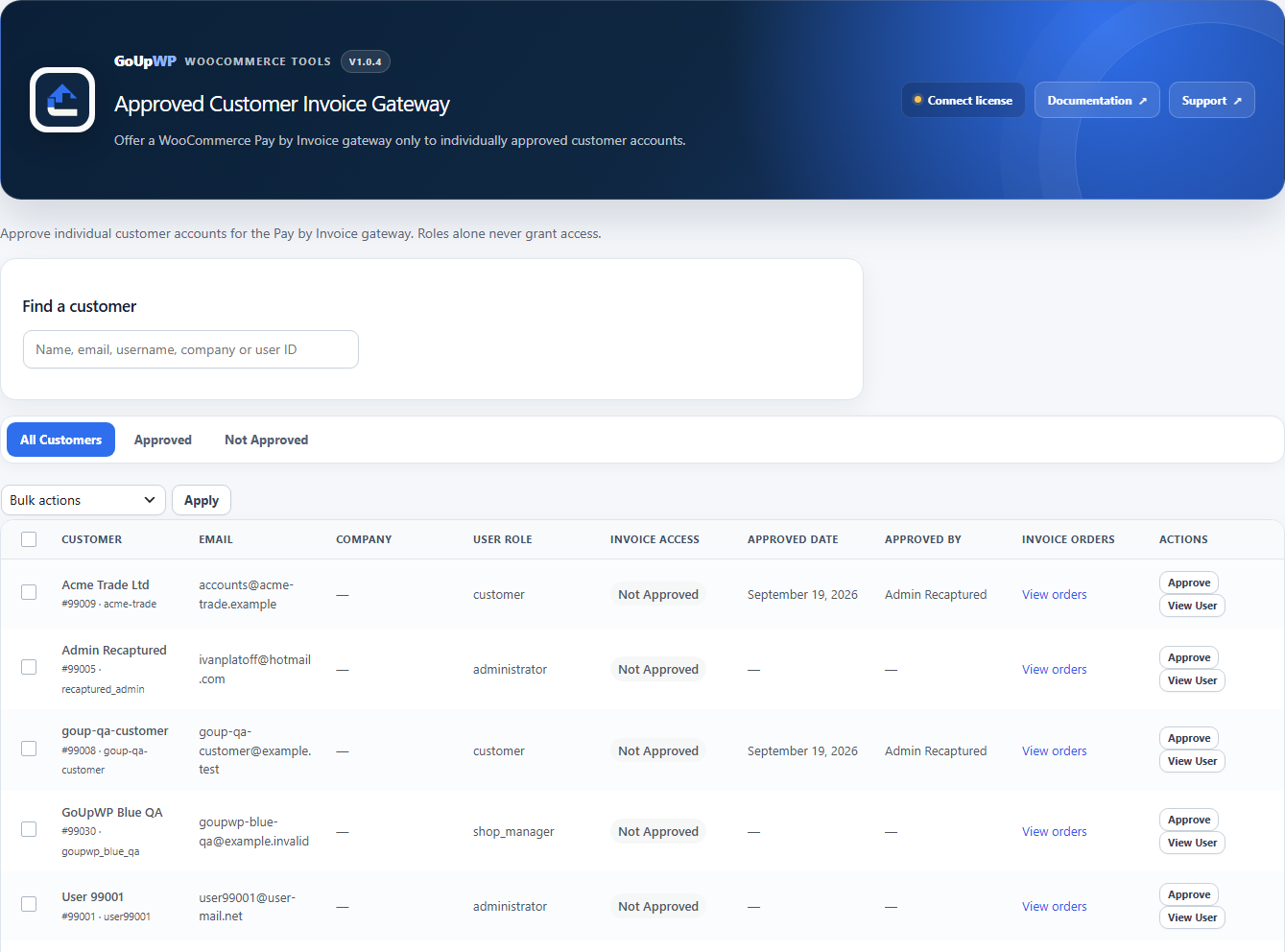
How eligibility is enforced
- The gateway is offered only to logged-in users whose account is approved — at checkout load, at order placement (classic and Store API), and on the pay-for-order page, where a customer can only use it for their own orders.
- Approval, the effective terms and the approval timestamp are snapshotted on the order, so revoking a customer later never changes historical orders. The order screen shows both the snapshot and the customer's current status.
- Administrators can still choose the method when creating orders manually in the dashboard.
- Guests, unapproved accounts and roles never see it — approval is per user, never per role.
When a customer asks why they cannot pay by invoice, Diagnostics explains exactly which check failed — not logged in, not approved, or blocked by another rule.
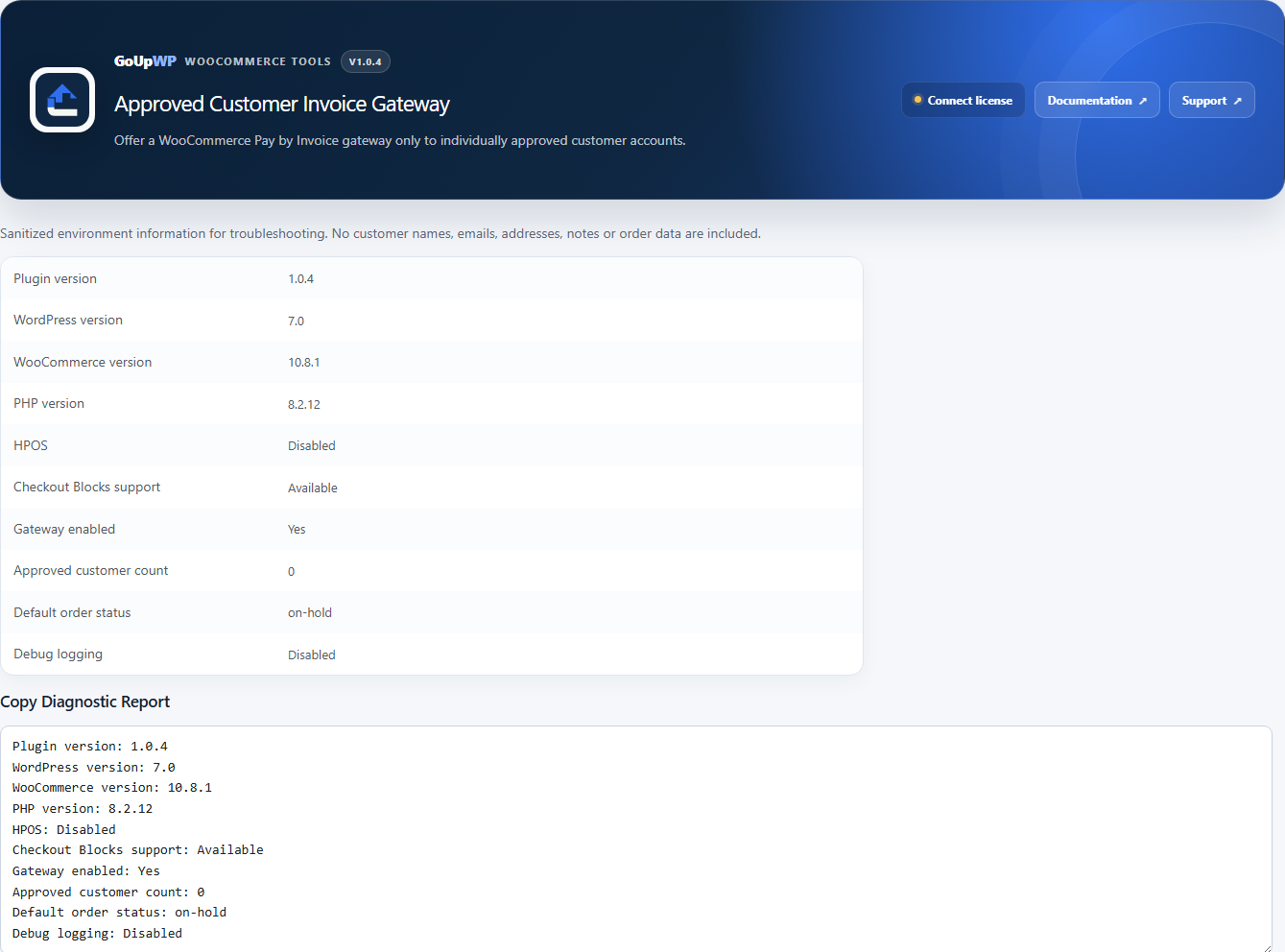
Works with the classic checkout, the Checkout Block and HPOS. It does not create PDFs, invoice numbers, accounting entries, credit checks or online transactions; it is the payment method and the approval record, and it hands off cleanly to whatever you use for invoicing.
Price: $12 per year for one production site plus one staging site, or $49 lifetime. Documentation · Pricing.
Comparison: ways to take invoice payments in WooCommerce
| Approach | Per-customer approval | Terms on order | Checkout Block | Cost |
|---|---|---|---|---|
| Enable BACS/Cheque for everyone | No | No | Yes | Free, and risky |
| Cheque + user-meta snippet (above) | Manual meta | No | Yes | Free + dev time |
| Free "invoice gateway" plugins | Usually role-based | Rarely | Varies | Free |
| B2B suites with invoice gateway | Usually group-based | Sometimes | Usually | Paid, larger suite |
| GoUp Approved Customer Invoice Gateway | Yes, per user, bulk | Yes, snapshotted | Yes | $12/year |
Setting it up for a wholesale store
- Keep your public gateways (Stripe, PayPal) enabled for everyone.
- Enable Pay by Invoice, status On hold, default terms Net 30.
- Approve trade accounts as they pass your credit check; put "Net 60 — PO required" as a per-customer override for the few that negotiated it.
- Optionally restrict which products can be invoiced with Payment Gateway by Product & Category (for example no invoicing on clearance lines).
- Keep invoice reconciliation in your accounting package: invoice customers pay later, outside the checkout. For shoppers who pay by bank transfer at checkout, you can collect a transfer receipt with the order instead.
Troubleshooting
An approved customer cannot see Pay by Invoice. They are not logged in, or the cart contains a product that another gateway rule restricts. Check the customer's status on the Invoice Customers screen.
The gateway appears for a guest. It should not; confirm the plugin is active and no other plugin is force-enabling gateways.
The order shows different terms from the customer's profile. That is by design: the order shows the terms at the time of purchase (snapshot) alongside the customer's current setting.
Related guides
- Disable a payment method for specific products or categories
- Disable Cash on Delivery by country
- Let customers upload proof of payment at checkout
- All WooCommerce payment plugins
Summary
WooCommerce has no invoice gateway and no per-customer payment approval. Renaming the Cheque gateway and hiding it behind a user-meta flag works for a handful of trusted accounts. Once you have a real trade-account process — credit checks, different terms per customer, an accountant asking what was agreed on an order six months ago — you need approvals you can search and revoke, and terms snapshotted on every order.
Frequently asked questions
How do I offer net 30 terms to some WooCommerce customers but not others?
Approve those customers individually. With GoUp Approved Customer Invoice Gateway, approval is per user account — not per role — so a wholesale role does not automatically grant invoice access. Approved customers see Pay by Invoice at checkout; everyone else pays with your normal gateways.
Can guests use Pay by Invoice?
No. Pay by Invoice requires a logged-in, individually approved customer account. Invoice terms are a credit decision and need an identity behind them.
Does the plugin generate PDF invoices or chase payment?
No. It provides an offline payment method and records the terms and approval on the order. Use your accounting package (Xero, QuickBooks, Sage) or a PDF invoice plugin for the document itself.
What happens to old orders if I revoke a customer?
Future invoice eligibility is removed immediately. Existing orders keep their historical approval and terms snapshots unchanged, and the order screen shows both the snapshot and the customer's current status.
Does it work with the Checkout Block and HPOS?
Yes. Eligibility is checked when checkout loads, when the order is placed (classic and Store API) and on the pay-for-order page, and order data is written through WooCommerce CRUD APIs.