
WooCommerce's Direct Bank Transfer (BACS) gateway cannot collect a payment receipt. To let customers upload proof of payment at checkout, install GoUp Checkout Proof of Payment Upload, enable it for BACS or another manual gateway, and choose Required or Optional, the file types and the size limit. Each file is validated, saved with a random name in a protected folder that blocks direct access, attached to the order, and viewable only through an authenticated link.
Key takeaways
- WooCommerce's Direct Bank Transfer (BACS) gateway puts orders On hold but cannot collect a receipt or screenshot.
- A plain file field saved with wp_handle_upload() lands in the public uploads folder, where bank receipts can be downloaded by URL.
- A safe upload validates extension, MIME type and image integrity, stores files with random names in a protected folder, and serves them only to authorised users.
- Uploads must work through the Store API to appear in the Checkout Block, and abandoned uploads must be cleaned up.
Bank transfer is still the cheapest way to get paid, and in many markets — the Middle East, South and South-East Asia, parts of Europe — it is the expected way. WooCommerce supports it through Direct Bank Transfer (BACS): the order goes On hold, the customer sees your account details, and you wait. What WooCommerce does not do is let the customer prove they paid. Staff end up matching bank statements to order numbers by hand, or asking customers to email screenshots. This guide explains how to let customers upload proof of payment at WooCommerce checkout, why building your own upload field is a security problem, and how to do it properly.
What the BACS gateway does and does not do
- Shows account details on the thank-you page and in the On-hold email.
- Sets the order status to On hold until you mark it Processing manually.
- Does not collect a receipt, a transaction reference, or a screenshot.
- Does not give the customer a place to attach anything to the order.
The same is true for Cheque, Cash on Delivery and any other manual or offline gateway.
Why "just add a file field to checkout" is risky
Adding an <input type="file"> to the checkout form is easy. Doing it safely is not:
- Public storage. Anything saved through
wp_handle_upload()lands inwp-content/uploads/where it is directly downloadable by URL. Bank receipts contain names, account numbers and balances. - File-type spoofing. A PHP file renamed to
.jpgpasses an extension check. You need MIME sniffing and, for images, an integrity check. - Checkout Block support. The block checkout does not render classic form fields; uploads have to go through the Store API.
- Retention. Abandoned checkouts leave orphaned receipts with personal data unless something cleans them up.
- Access control. Staff need to view the file; the customer may need to see their own; nobody else should.
A code snippet that covers all of that is a plugin. So use one.
How to collect proof of payment without code
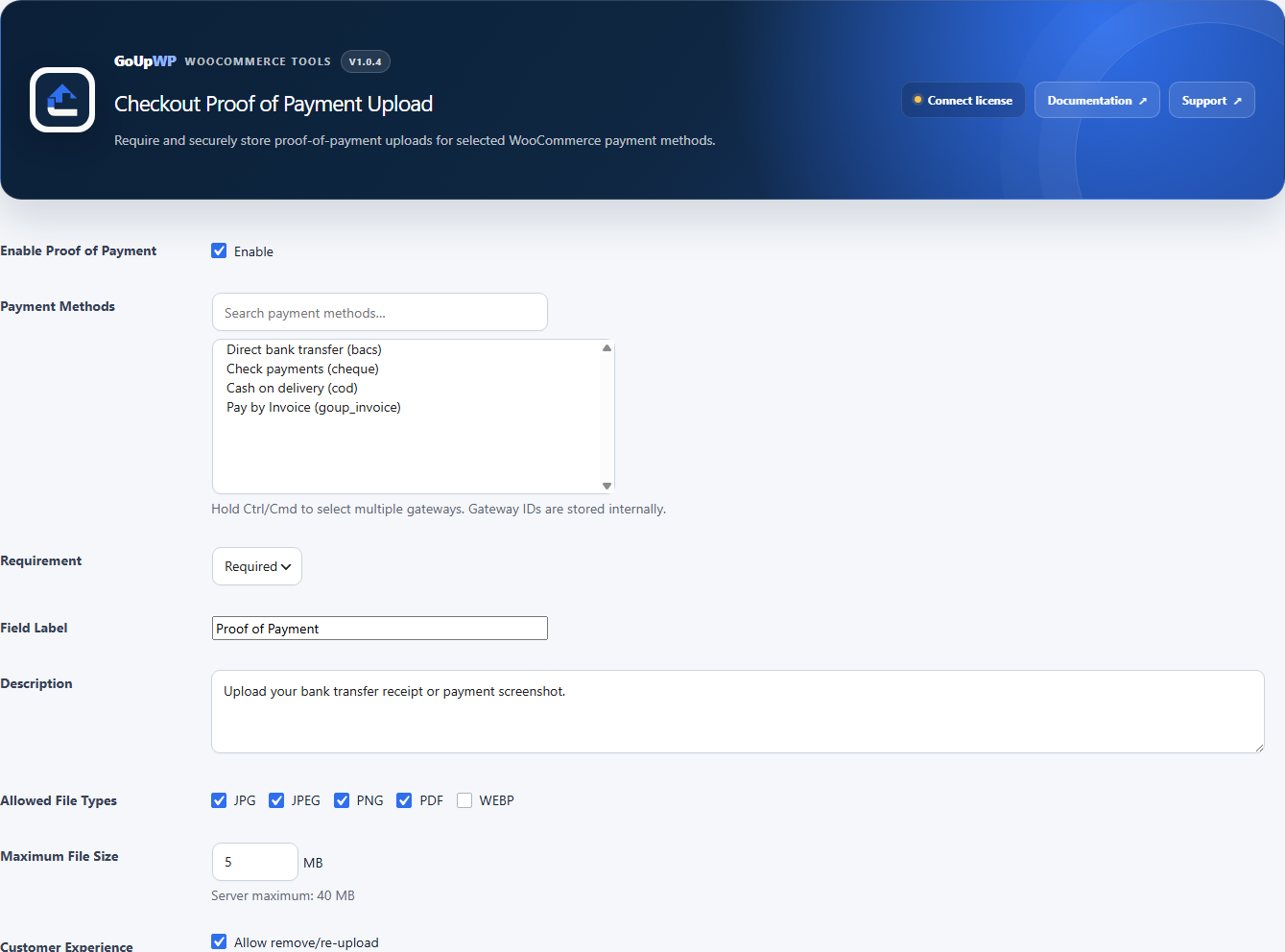
GoUp Checkout Proof of Payment Upload adds a gateway-aware receipt upload to WooCommerce checkout. Setup is under WooCommerce → Proof of Payment:
- Enable the feature and tick the payment methods that should ask for a proof — typically Direct bank transfer, optionally Cheque or a local manual gateway.
- Requirement: Required blocks "Place order" until a file is uploaded; Optional only offers the field.
- Label and description the customer sees ("Upload your bank transfer receipt — JPG, PNG or PDF").
- Allowed types (JPG, PNG, WEBP, PDF) and maximum size, capped by the server's upload limit.
- Per-gateway overrides if one method should be required with a different label or size limit than another.
- Allow replacing an upload before the order is placed; show in My Account lets the customer see their own proof on the order page; notify admin adds a link to the proof in admin order emails.
- Temporary retention (hours) for abandoned uploads; Delete data on uninstall and also delete files for clean removal.
What happens under the hood
- The file is uploaded the moment it is chosen (AJAX on the classic checkout, REST on the Checkout Block), validated by extension, MIME type and image integrity, rate-limited per session, and stored under
wp-content/uploads/goup-proof-of-payment/temporary/with a random name. Only an opaque token returns to the browser. - When the order is placed the token is verified (same session, same gateway, not expired) and the file moves to the
orders/folder. The order gets an order note and the file details as order meta. - Both folders are protected with
index.php,.htaccess(Apache 2.2 and 2.4) andweb.config. Files are only ever served through the plugin's authenticated download endpoint, with a sandboxed Content-Security-Policy so a malicious PDF cannot run scripts in the admin.
Staff workflow
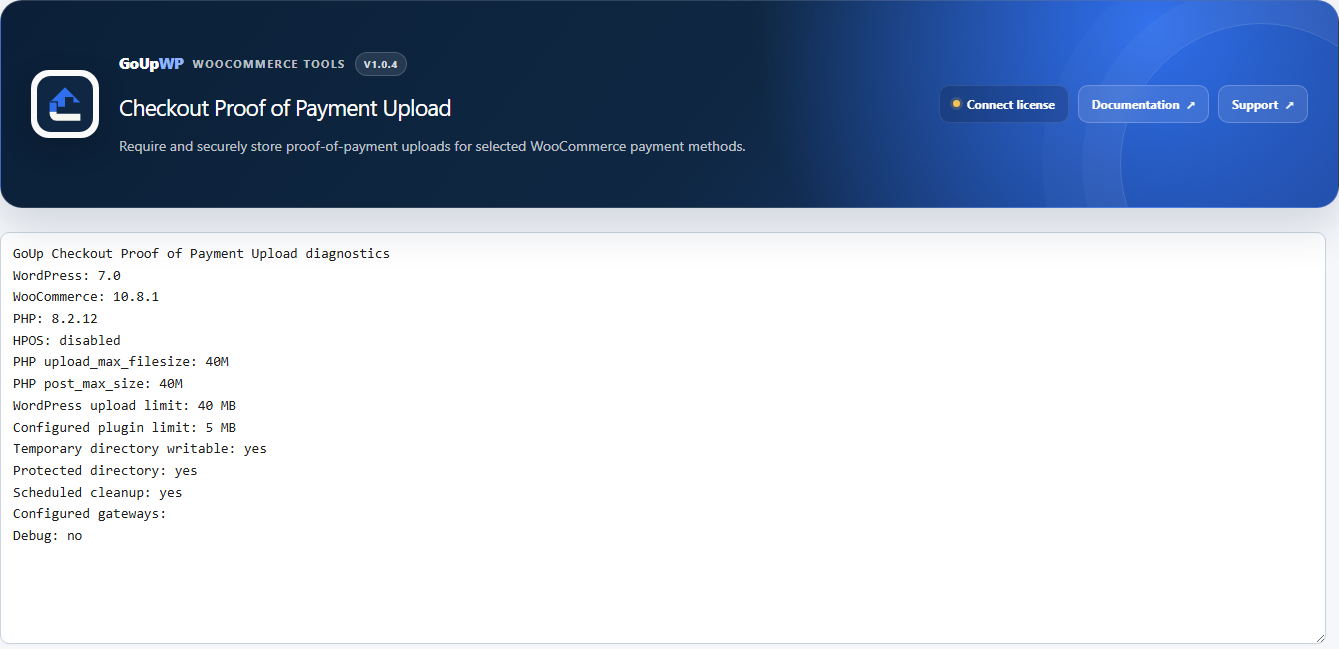
The order screen shows the file name, type, size and gateway with View / Download and Delete buttons. Deleting the order (or trashing it under HPOS) deletes the proof too. WooCommerce → Proof Diagnostics shows the storage location, the server's upload limit and table status when something needs checking.
Works with the classic checkout, the Checkout Block and HPOS. Price: $12 per year for one production site plus one staging site, or $49 lifetime. Documentation · Pricing.
Recommended settings by store type
| Store | Gateways | Requirement | Types |
|---|---|---|---|
| B2C store, bank transfer common | BACS | Required | JPG, PNG, PDF, 5 MB |
| B2B store, invoices paid by transfer | BACS, Cheque | Optional (finance reconciles) | PDF, 10 MB |
| Marketplace in a cash-transfer market | BACS, local wallet gateway | Required | JPG, PNG, WEBP, 3 MB |
| Pre-order / deposit workflow | BACS | Required, allow replacing | JPG, PDF |
How this speeds up order processing
With a receipt attached to the order, the person confirming payments opens the order, compares the receipt to the bank feed, and clicks Processing. No email hunting, no "please send the screenshot again", and a clean audit trail if a payment is later disputed. Enable notify admin so the link is in the New Order email and reconciliation can happen from the inbox.
Troubleshooting
Upload fails with a size error. The maximum size is capped by the server's upload_max_filesize. Check Proof Diagnostics for the effective limit and raise it in PHP settings or with your host.
The field does not appear in the Checkout Block. Confirm the gateway is ticked under Proof of Payment and that the customer has selected it; the field only renders for enabled gateways.
Customer chose the wrong file. Turn on Allow replacing so they can swap it before placing the order; after the order is placed, staff can delete the proof from the order screen.
Related guides
- Offer Pay by Invoice to approved B2B customers only
- Disable Cash on Delivery by country
- Disable a payment method for specific products
- All WooCommerce payment plugins
Summary
WooCommerce's Direct Bank Transfer gateway cannot collect a receipt, and a home-made checkout upload field puts customers' bank details in the public uploads folder. What you need is an upload that is validated, stored privately, tied to the order, visible only to staff and the customer, and cleaned up when a checkout is abandoned — in both the classic checkout and the Checkout Block. That is a plugin-sized job, not a snippet.
Frequently asked questions
Can I make the proof of payment required before the customer can place the order?
Yes. Set Requirement = Required for the gateway. 'Place order' is blocked until a file has been uploaded and validated; Optional simply offers the field. You can set a different requirement, label or size limit per gateway.
Where are uploaded receipts stored, and are they public?
Files are stored under wp-content/uploads/goup-proof-of-payment/ with random names, protected by index.php, .htaccess (Apache 2.2/2.4) and web.config, and served only through the plugin's authenticated download endpoint with a sandboxed Content-Security-Policy. They never appear in the Media Library.
Can the customer upload the receipt after checkout instead?
Not in the current version. Uploads are supported on the standard checkout, classic and Checkout Block. The pay-for-order page behaves differently from gateway to gateway, so it is not declared supported; test it with your gateway before relying on it. A customer who forgets can reply to the On-hold email with the receipt, and staff can still view or delete any proof already attached to the order.
Does it work with the WooCommerce Checkout Block?
Yes. The classic checkout uploads through AJAX; the Checkout Block uploads through REST and the official Blocks integration points. Order metadata is written through WooCommerce CRUD APIs for HPOS compatibility.
What happens to abandoned uploads?
Uploads sit in a temporary folder until the order is placed. A Temporary retention setting (hours) controls how long an abandoned file is kept before hourly cleanup deletes it, so unfinished checkouts do not accumulate personal data.